
In this section you will learn how to:
Modifying Invitation Details
Once you have created an invite you can edit the invitation details before the event starts. You can change the date and time of the event, the duration, and also the visitor information.
- On the Dashboard screen, tap Visitor Management.
- On the Visitor Management page, under the Upcoming tab, tap the invitation that you want to modify.
The Invitation Details page is displayed. - Tap Edit.
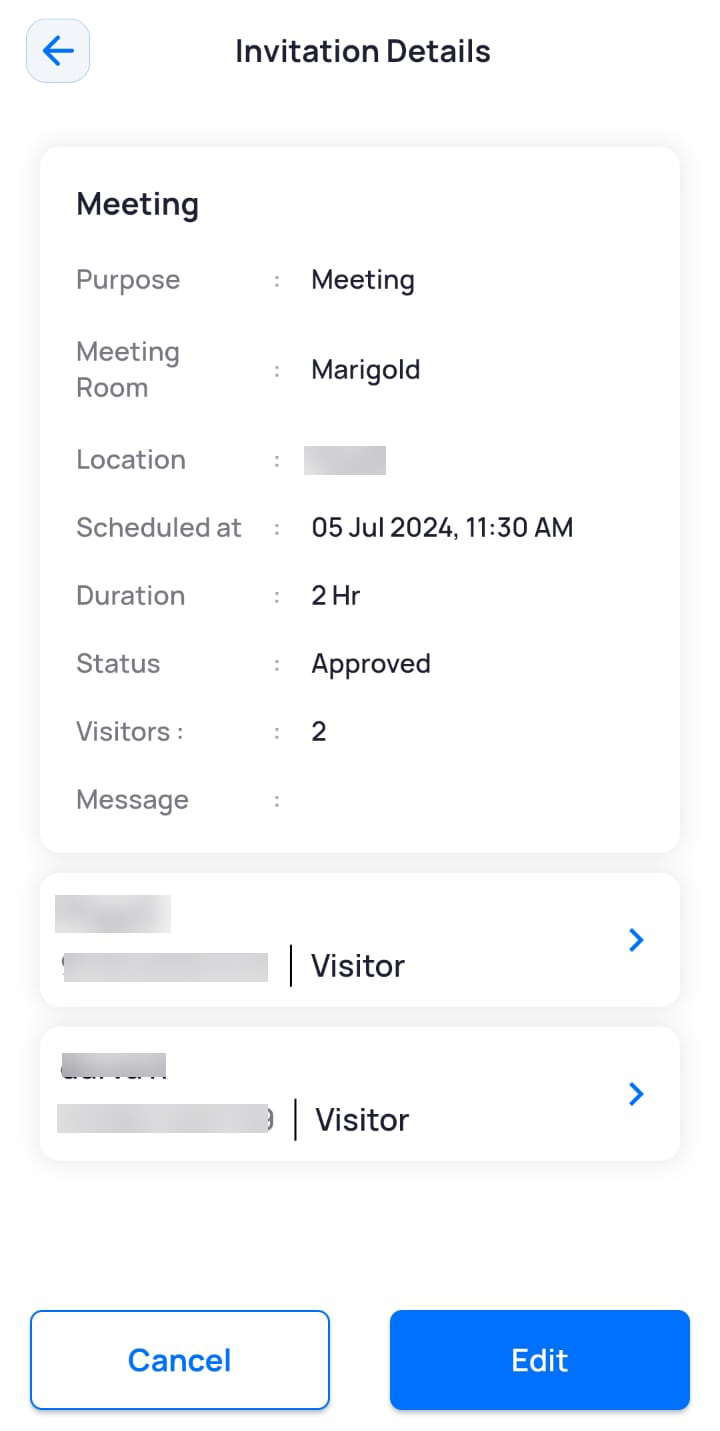
- Modify the required field(s).
- Tap Update.
If a meeting room is not booked, a pop-up message to book a meeting room is displayed (only if the meeting room module has been integrated with the visitor management module). - In the Meeting Room field, tap the Book meeting room link.
A list of available meeting rooms is displayed. - Click Book for any one meeting room.
A pop-up message confirming your meeting room booking is displayed. - Click OK.
Cancelling an Invitation
- On the Dashboard screen, tap Visitor Management.
- On the Visitor Management screen, under the Upcoming tab, tap the invitation that you want to delete.
The Invitation Details page is displayed. - Tap Cancel.
The invitation is cancelled and is also removed from the Upcoming tab.