
The Dashboard screen of the Apptimus app offers easy access to a variety of modules, all at your fingertips. Regardless of whether you are an employee, vendor, or admin, the app is designed to help you seamlessly navigate through your specific module. Each role comes with tailored functionalities, allowing you to perform necessary actions efficiently. With a user-friendly interface, you can quickly find the tools and features that suit your needs, ensuring a smooth experience.
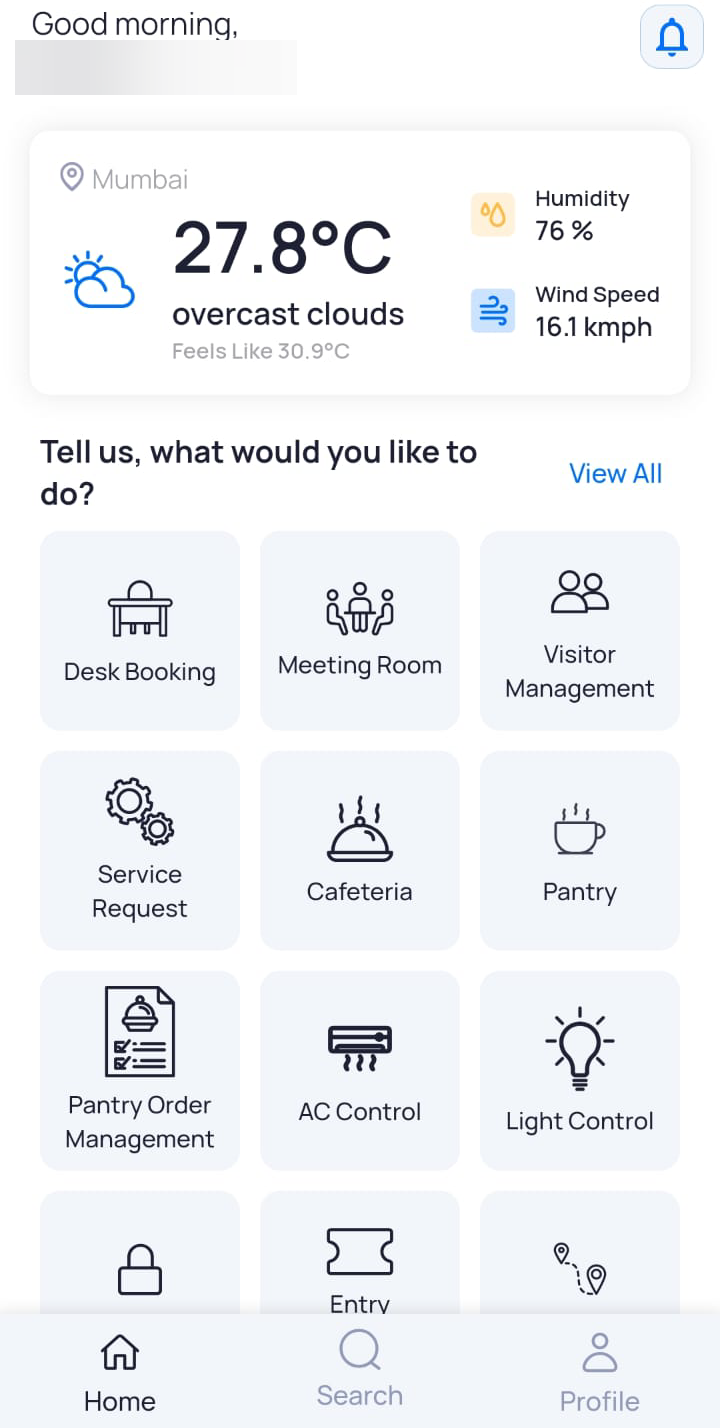
The following information is displayed on the Dashboard:
- User Name: Displays the name of the logged in user in the top left corner of the screen.
- Notifications: Access notifications via the icons located in the top right corner of the screen.
- Weather: Current weather information is presented in the upper half section of the screen.
- Modules: The lower half section of the screen provides access to various app modules. Access to these modules varies based on the user role, so displayed options may differ.
- Navigation icons:
- Home: Helps you return to the dashboard from any screen in the app.
- Search: Enables you to search for your colleagues within the same campus.
- Profile: Enables you to manage your profile settings. For more information, click here.